We’re surrounded by voices talking to machines—”Hey Siri,” “OK Google,” “Alexa…”—but behind those casual commands sits some serious voice AI technology. It’s changing how we search, support customers, and run businesses.
In this guide, we’ll break down what voice AI actually is (in plain English), how it works step by step, why it’s critical for voice search optimization, and how beginners can start using it without getting overwhelmed. We’ll also look at the best setups for call centers, common mistakes to avoid, and who should (and shouldn’t) immerse right now.
What Is Voice AI Technology (And Why It Matters Today)
Voice AI technology explained in simple terms
At its core, voice AI technology is software that lets computers understand, process, and respond to human speech in a natural way.
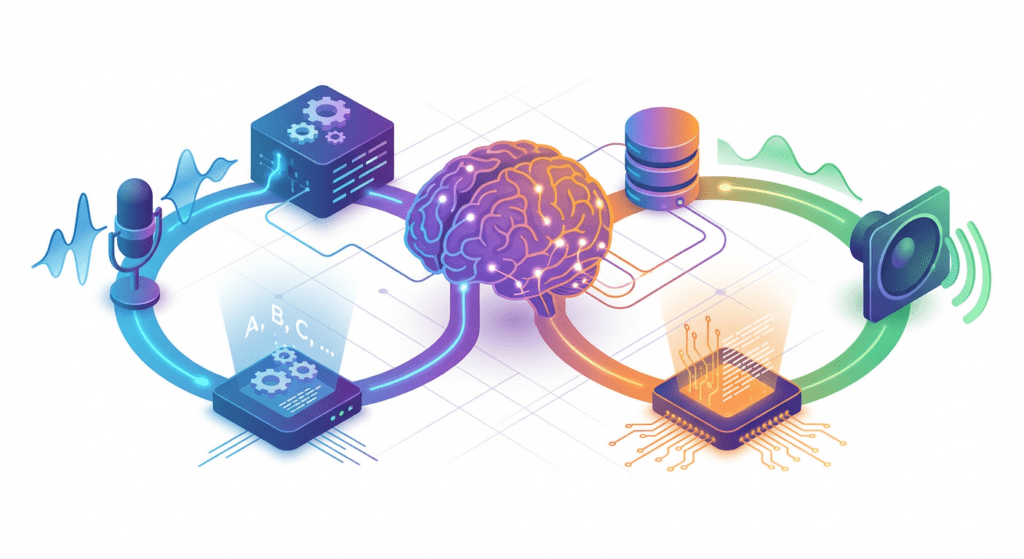
We can break that down into three simple ideas:
It hears us – The system captures our speech with a microphone.
It understands us – It turns audio into text and then interprets what we mean.
It talks back – It generates a useful response, often in a natural-sounding voice.
Unlike old-school phone menus that made us “press 1 for billing,” voice AI lets us say things like, “I want to change my payment method” and still route us correctly. It’s not just speech-to-text: it’s understanding intent, context, and sometimes even sentiment.
We see voice AI every day in:
Smart speakers and virtual assistants
In-car voice systems
Customer service bots and call center IVRs
Voice-enabled apps (banking, retail, healthcare, and more)
It matters today because our behavior has shifted. We’re using our voices to search, shop, and solve problems. Businesses that don’t adapt to voice-first interactions risk feeling clunky and outdated very quickly.
How voice AI differs from traditional voice systems
Traditional voice systems, like basic IVRs or older speech recognition tools, are mostly rule-based. They follow strict scripts:
You say or press a specific option
The system follows a pre-defined path
Anything off-script confuses it
Voice AI technology works very differently:
It uses machine learning models instead of rigid rules
It can handle natural language, not just exact phrases
It learns from real conversations and improves over time
For example, a traditional system might only recognize “Account balance.” A voice AI system can handle:
“How much money do I have left?”
“What’s my current balance?”
“Can you tell me how much is in my checking?”
All of those map to the same intent. That flexibility is what makes voice AI feel more human and far more useful, especially at scale.
How Voice AI Technology Works Step by Step
Speech recognition and natural language understanding
The journey from our voice to a smart response happens in several stages.
First, the system records our voice and turns the sound waves into text. Modern ASR models are trained on massive audio datasets so they can deal with different accents, speeds, and noise levels.
2. Natural Language Understanding (NLU)
Once the text is ready, NLU kicks in. This is where the system:
Looks at context (previous messages, account status, etc.)
If we say, “Book me a flight to Denver next Friday,” ASR gives the words; NLU figures out:
Intent: book_flight
Entity 1: Denver (destination)
Entity 2: next Friday (date)
Intent detection and response generation
After understanding what we said, the system needs to decide what to do.
3. Intent detection and decisioning
The voice AI engine maps our request to a specific action. That might be:
Looking up data in a CRM or database
Triggering a workflow (reset password, schedule appointment)
Asking follow-up questions to clarify details
4. Response generation
Once the system knows what to do, it needs to say something back. That often involves:
Rule-based responses: Pre-written prompts like, “I’ve sent a password reset link to your email.”
AI-generated language: More flexible, conversational responses produced by language models.
Finally, text-to-speech (TTS) converts the response into audio, often using neural voices that sound surprisingly human.
Where AI fits into the voice interaction process
AI shows up in multiple layers of the voice interaction process:
ASR models: Deep learning converts raw audio to accurate text
NLU models: Classify intent and pull key entities from sentences
Dialogue management: Machine learning helps decide the next best action
NLG/TTS: AI helps craft and speak natural responses
The more data we feed these components—real conversations, feedback, corrections—the better they get. That’s why modern voice AI technology can feel dramatically smarter than systems even a few years old.
Why Voice AI Is Important for Voice Search Optimization
How people use voice search differently from text search
When we type, we compress. When we talk, we ramble.
In text, we might search: “best running shoes budget”.
With voice, we’re more likely to say: “What are the best budget running shoes for flat feet?”
Voice searches tend to be:
Longer and more conversational
Question-based (“how,” “what,” “where,” “when”)
More local (“near me,” “close by,” “in my area”)
That shift changes how we optimize for search. We’re no longer just targeting short, typed keywords: we’re targeting natural, spoken language.
AI technologies for voice search optimization explained
Voice AI technology helps us adapt to these new patterns in a few key ways:
Natural language processing (NLP): Helps analyze real voice searches and surface the phrases, questions, and intents people actually use.
Semantic search: Instead of matching exact keywords, AI maps related meanings, so “cheap” and “budget-friendly” can be treated similarly.
Structured data and markup: AI systems can help us generate and optimize schema so search engines better understand our content for voice answers.
If we’re optimizing a website or content strategy, we can use AI-driven tools to:
Identify question-based queries (like those used by smart speakers)
Group related voice search intents
Create content that directly answers those questions in a concise, spoken-friendly way
How voice AI improves search intent matching
The real power of voice AI for search optimization is its ability to bridge the gap between how people talk and how systems index content.
Here’s how:
It analyzes user phrasing and patterns to uncover real intent
It ties those intents back to specific content pieces, FAQs, and landing pages
It helps prioritize content that answers high-value, high-intent voice queries
For example, if users keep asking, “How long does shipping take if I order today?” an AI system can flag that as a core voice intent. We can then:
Add a clear, direct answer on our site
Optimize a FAQ for that phrasing
Use structured data so voice assistants can surface that answer directly
When we align our content with real spoken questions, we’re not just optimizing for search engines—we’re optimizing for actual human conversations. Google’s search documentation provides detailed guidance on implementing structured data for enhanced voice search visibility.
Step-by-Step Guide to Using Voice AI Technology for Beginners
Step 1: Choose the right voice AI platform
We don’t need to build everything from scratch. The easiest way to start is by picking a platform that already handles:
Speech recognition
NLU and intent management
Integrations with our website, app, or contact center
When evaluating platforms, we should look at:
Ease of use – Is there a visual interface for building flows and intents?
Pre-built templates – Are there templates for support, FAQs, booking, or sales?
Channel support – Can we deploy to phone, web chat with voice, or smart speakers?
Analytics – Does it show where users get stuck or drop off?
If we’re just starting, simple often beats “fancy.” We want something we can launch quickly and improve as we go.
Step 2: Build basic voice intents and responses
Once we’ve picked a platform, we start small:
List top 5–10 common questions or tasks users ask today (We can pull this from support tickets, chat logs, or call transcripts.)
Create intents for each one, such as:
Check_order_status
Reset_password
Update_billing
Book_appointment
Add example phrases per intent, for example:
“Where’s my order?”
“Track my shipment”
“Has my package shipped yet?”
Write clear responses that sound natural when spoken aloud. We should:
Keep sentences short
Put the most important info first
Avoid jargon or dense text
Step 3: Test and improve real voice interactions
The real learning happens once we go live.
We should:
Test with real users (or teammates) using their normal speech patterns
Listen to recordings or transcripts to see where the system fails
Add new example phrases when we spot queries that weren’t recognized
A simple improvement loop looks like this:
Launch with a small set of intents
Collect conversations for a week or two
Review failed matches and confusing moments
Add training data, tweak prompts, refine flows
Repeat
Within a few cycles, our voice AI technology will start to feel much more natural and accurate, without us needing to be machine learning experts.
Best Voice AI Technology for High-Volume Call Centers
What high-volume call centers need from voice AI
High-volume call centers operate under intense pressure: high call loads, strict SLAs, and demanding customers. When we bring voice AI into that environment, a few needs rise to the top:
Fast, accurate routing – Getting callers to the right place on the first try
High containment – Solving as many issues as possible without a human agent
Smooth handoffs – When an agent is needed, they get full context instantly
24/7 coverage – Handling after-hours and peak spikes automatically
If the voice AI doesn’t reduce wait times, improve customer experience, or lower costs, it’s not doing its job.
Key features to evaluate before choosing a solution
For call centers, not all voice AI platforms are equal. We should focus on features that directly impact operations:
Telephony and CCaaS integrations (Genesys, Five9, Amazon Connect, etc.)
Real-time transcription for quality, compliance, and agent assist
Omnichannel orchestration – Voice, chat, and messaging staying in sync
Agent assist tools – Suggested responses, knowledge search, and summarization
Analytics and reporting – Containment rates, average handle time, sentiment
Security and compliance (PCI, HIPAA, GDPR) should also be near the top of our checklist, especially in regulated industries. AWS’s contact center AI documentation outlines industry best practices for implementing enterprise-grade voice AI solutions at scale.
Scalability and accuracy considerations
High-volume environments expose weak systems very quickly.
On the scalability side, we need:
Capacity to handle large call spikes (product launches, outages, holidays)
Reliable uptime and redundancy
Global language and accent support if we operate in multiple regions
On the accuracy side, we should look for:
Domain-specific tuning – Models trained or adapted to our industry
Ongoing model improvement cycles based on real call data
Tools for supervisors to easily label, correct, and retrain intents
Eventually, the best voice AI technology for call centers is the one that can grow with our volumes, learn from our customers, and keep our agents focused on the complex, high-value conversations.
Common Mistakes Beginners Make with Voice AI Technology
Automating too much too early
One of the biggest traps we see: trying to automate everything on day one.
When we over-automate:
Customers hit dead ends when the system doesn’t understand them
Edge cases multiply faster than we can handle
Internal teams lose trust in the solution
A better approach is to:
Start with a narrow, high-impact set of use cases
Prove value (faster service, lower costs, better CSAT)
Expand carefully as the system and team mature
Ignoring real user voice data
Another common mistake is designing flows in a conference room and never revisiting them.
If we’re not:
Reviewing transcripts and recordings
Tracking unrecognized intents
Listening to how people actually speak
…our voice AI will stagnate.
Real user data is the fuel that makes voice AI smarter. We should treat conversation reviews like we treat website analytics—something we look at regularly, not once a quarter. MIT Technology Review’s research on conversational AI explores how continuous learning from real user interactions drives improvements in natural language systems.
Who Should Use Voice AI Technology (And Who Should Wait)
Ideal use cases for beginners
Voice AI technology isn’t only for tech giants. There are plenty of practical, starter-friendly use cases:
Customer support FAQs – Order status, hours, locations, simple policy questions
Lead qualification – Collecting key details before routing to sales
If we’re handling repetitive questions at scale, through phone, chat, or both, voice AI can free up teams and improve response times fast.
When voice AI may not be the right fit
There are also situations where we may want to wait or move more cautiously:
Very low volume – If we only get a handful of calls or requests per week, manual handling may be simpler and cheaper.
Highly complex, nuanced decisions – For example, sensitive legal or medical advice that requires detailed human judgment.
No internal owner – If no one can own, monitor, and improve the system, it’ll degrade over time.
In those cases, we can still start experimenting on a small scale—maybe with internal tools, basic FAQs, or after-hours coverage—while keeping humans in the loop for anything sensitive or complex.